Admin-only drawer
The Benchmarks drawer and benchmark actions require an admin session.
Benchmarks is an admin-only drawer for comparing eligible local models against the built-in CE prompt set.
The drawer shows status, progress, prompt counts, best run per model, detailed per-run results, and benchmark question editing.
The Benchmarks drawer and benchmark actions require an admin session.
An eligible language model must be present, enabled, and marked for benchmarks by an administrator. Speech-to-Text checkpoints and projector assets are excluded from ordinary chat benchmark choices.
Disabled models are not selected for benchmark runs. The registry UI shows a non-clickable benchmark state until an admin enables the model.
The CE benchmark uses the built-in Core Suite prompt set. The editor expects exactly five non-empty questions.
While a benchmark is running, the CE Benchmark Questions panel is locked. The admin must stop the benchmark before editing questions.
Saving benchmark question changes does not delete old results. Existing CE results for that prompt set are marked stale so admins know they were produced with earlier questions.
| Step | What happens |
|---|---|
| Start | The admin starts a run from the Benchmarks drawer. A force option reruns models that already have results. |
| Prepare | The benchmark worker manages the language-model processes for its runs. Account for other workloads and available memory; do not assume it will unload a separate speech workload. |
| Launch and retry | Benchmark models launch through the same runtime helpers used by main model controls. Retry logic can fall back to CPU loading for retryable load failures. |
| Run prompts | Each eligible model runs through the five-prompt set. Warmup and per-prompt measurements are recorded. |
| Progress | The UI receives status, current model, current prompt, counts, and progress updates over Socket.IO. |
| Stop | The Stop control requests benchmark cancellation and stops benchmark-managed model processes. |
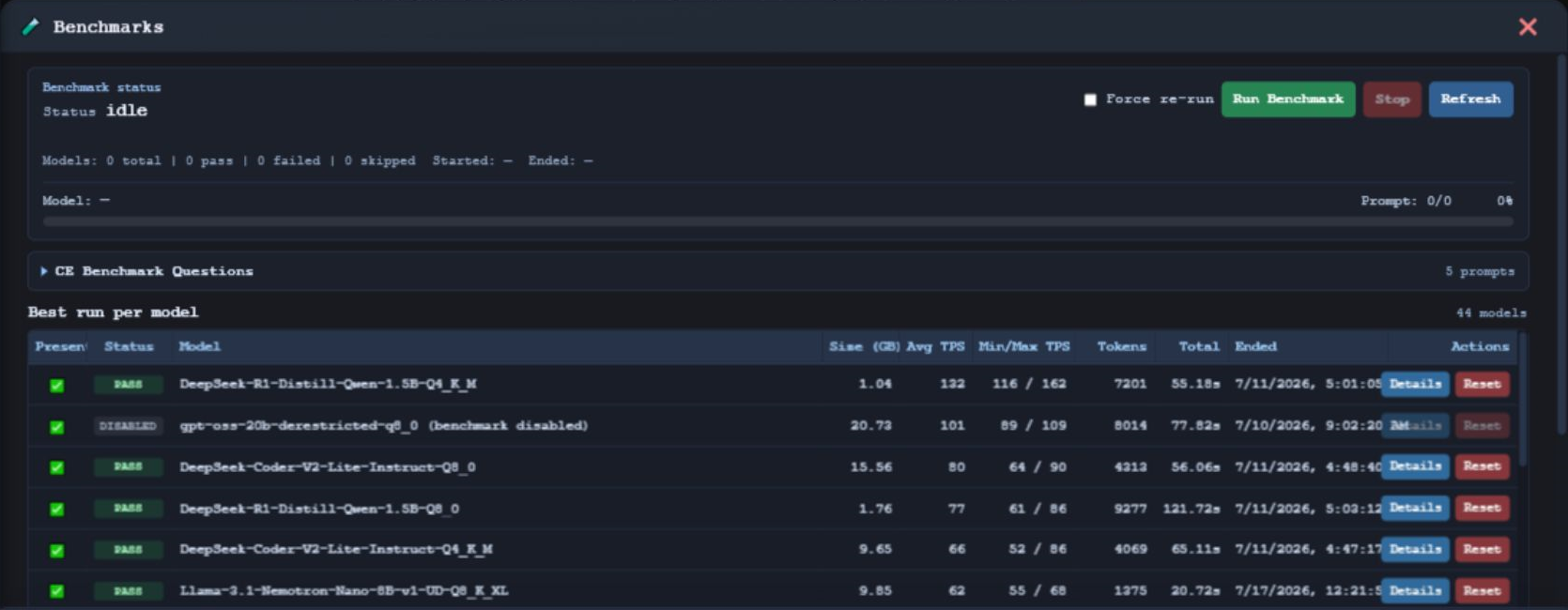
The drawer lists the best run per model with presence, status, model, size, average TPS, min/max TPS, token count, total, end time, and actions.
Admins can open a run to see summary metrics and per-prompt response details.
The reset action clears benchmark runs and results for a selected model identity. It is disabled while a benchmark is running.
www.llmcontroller.comLLM Controller on GitHub