Repository
Source and current release downloads for LLM Controller CE.
RepositoryWhen installation is incomplete, LLM Controller CE opens the installer instead of the normal login and application screens.
After installation, admins continue configuration from the Admin Settings drawer: runtime paths, ports, attachment limits, auth email settings, and settings backup.
CE v1.4.0 is publicly available. Download the matching release and follow its installation or upgrade guide. Runtimes and models are supplied separately; CE is not a bundled one-click desktop installer.
Source and current release downloads for LLM Controller CE.
RepositoryRelease-matched fresh-install and ordered upgrade instructions.
INSTALL.mdFresh installations only: prepare Python, requirements, a working MySQL server/account, a compatible runtime, and local models first. Keep an unfinished installer restricted to intended operators.
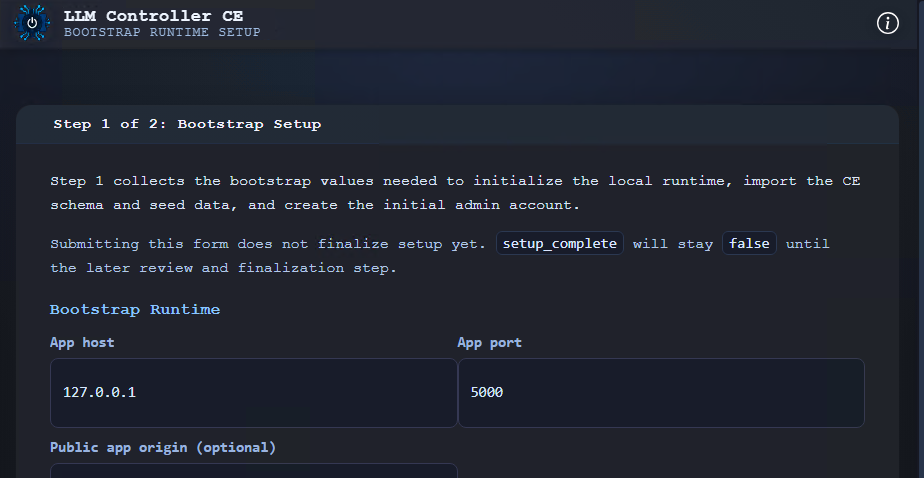
The operator enters app host/port, optional CORS origins, MySQL connection details, the first admin email/password, and the password policy choice.
The installer tests MySQL, saves bootstrap configuration, imports schema and seed SQL, creates the initial admin account with confirmed email status, and saves the selected password policy.
The operator reviews the seeded model directory, llama-server path, main/title ports, GPU layers, CPU threads, and dual-GPU split threshold. Saving writes defaults to MySQL and marks installation complete.
After installation is marked complete, the handoff page tells the operator to restart the app. The next clean start loads the normal login flow and authenticated app screens.
| Setting area | What admins can configure |
|---|---|
| Bootstrap database | View and save MySQL host and port. The app validates the connection before saving database host or port changes. |
| Model defaults | llama-server path, main and title ports, model scan directory, GPU layers, CPU threads, dual-GPU split threshold, temperature, top-k, top-p, repeat penalty, and seed. |
| Attachment limits | Attachment count, per-file/combined size, context, and chunk settings. Supported ceilings are 10 MiB per file and 40 MiB combined, not replacement defaults. Maximum Chat Import Size separately controls imports. |
| Auth email | SMTP enabled state, host, port, STARTTLS, username, password, sender email, public base URL, reset/confirmation token TTLs, and email request cooldown. |
| Settings backup | A settings export is not a full installation backup. See backup responsibilities and chat/Project export formats. |
The installer writes app bind and database connection settings to bootstrap_config.json by default. LLM_CONTROLLER_BOOTSTRAP_CONFIG can point the app at a different bootstrap config file.
The local flask_secret.key supplies application secret material and stored SMTP credential encryption key material. Preserve the matching key with protected installation backups.
The seed file includes scan directory LLMs, llama-server path llama-server/llama-server.exe, and default ports for the main and title model processes.
The seed file creates the default CE benchmark profile, Core Suite prompt set, and five benchmark prompts.
NVIDIA telemetry depends on nvidia-smi. AMD telemetry depends on ROCm tools such as rocm-smi or rocminfo. GPU offload also depends on the configured llama-server build and saved launch settings.
The repository includes start_llm_controller.bat. It checks for Python and app.py, then starts the Flask app with python app.py.
The app uses configurable paths for the model directory and llama-server executable. Linux operators run the Python app through their chosen shell or service setup.
Stop CE and take the coordinated backup described in Administration. Apply required upgrades in order before starting the new application version. Never run fresh-install schema or seed files against an existing installation.
For v1.3 to v1.4, the operator applies install/upgrade_v1_4.sql to the configured MySQL database. Earlier installations must complete their earlier upgrades first. This upgrade does not install speech software.
Follow the complete v1.4.0 upgrade instructions for backup, ordering, failure handling, and restart checks. All database actions remain manual operator work.
For remote browser access, distinguish the server listen address from the actual browser origin. Use HTTPS for remote microphone capture; HTTP to a remote LAN address is not localhost. Managed language, title, and speech runtimes remain loopback services.
www.llmcontroller.comLLM Controller on GitHub